> ## Documentation Index
> Fetch the complete documentation index at: https://docs.adriel.com/llms.txt
> Use this file to discover all available pages before exploring further.
# Data conversion
> Turn a non-ad data source — a spreadsheet, a CSV, or a database table — into a standalone ad channel that behaves like Meta Ads or Google Ads inside Adriel.
Data conversion turns a non-ad source — for example, a **Google Sheets** tab, a **CSV File Import**, or a **BigQuery** view — into a standalone ad channel inside Adriel. Once converted, the source behaves like an ad-platform connector: it shows up in ad data filters, contributes to channel-level totals, and can have complementary sources (a CRM, an MMP) blended onto it the same way they would blend onto **Meta Ads** or **Google Ads**.
This is different from data blending. Blending keeps the non-ad source as a side-by-side enrichment of existing ad rows; conversion promotes the source to a first-class channel.
## When to use Data Conversion vs Data Blending
Both Data Conversion and Data Blending live on the **Data integration** tab of every eligible data source's settings page, behind the same on/off toggle. The two modes solve different problems — pick **Data Conversion** to turn a non-ad source into a standalone ad channel, or [Data blending](/data-sources/data-integration/data-blending) to enrich existing ad rows with a complementary source:
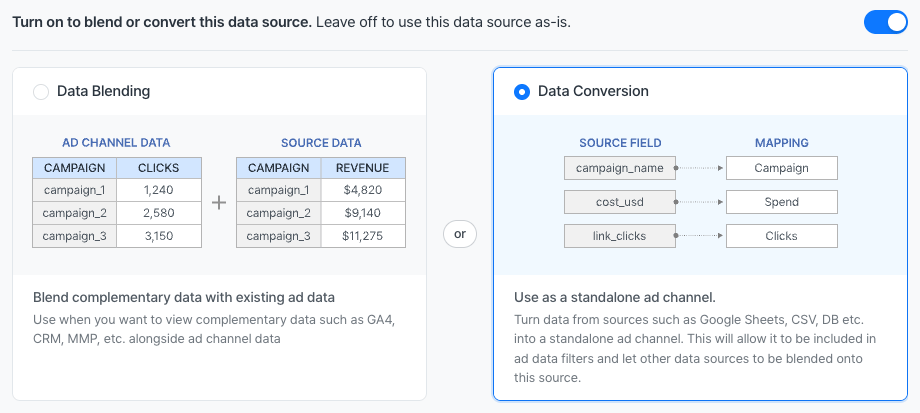 Concrete examples:
* A traditional print campaign tracked in Google Sheets — convert it so spend rolls up alongside Meta Ads and Google Ads in channel-level totals.
* An in-house affiliate program exported as a CSV — convert it so the affiliate channel can be filtered like any other ad source.
* A regional ad network with no direct API — pull totals into BigQuery, then convert so blended attribution data (HubSpot, AppsFlyer) can layer onto it.
## Eligible data sources
Data conversion is available for non-ad data sources where columns are user-defined:
* **Google Sheets**
* **CSV File Import**
* **BigQuery**, **PostgreSQL**, **Redshift**, **MySQL** (any of the database connectors)
* **Amazon S3** file imports
Marketing connectors (**Meta Ads**, **Google Ads**, **LinkedIn Ads**, **TikTok Ads**, etc.) already behave as ad channels and cannot be converted.
## Open the conversion settings
1. Open the **Connections** menu and pick the data source.
2. Open **Data source settings**.
3. Open the **Data integration** tab.
4. Turn the toggle on. The label reads *"Turn on to blend or convert this data source. Leave off to use this data source as-is."*
5. Pick the **Data Conversion** card — *"Use as a standalone ad channel. Turn data from sources such as Google Sheets, CSV, DB etc. into a standalone ad channel. This will allow it to be included in ad data filters and let other data sources to be blended onto this source."*
## Map source columns to ad-data columns
The conversion editor shows two columns:
* **Target field** — the ad-data column that the converted source will populate (Spend, Impressions, Clicks, Campaign, Ad Set, etc.).
* **Source field** — the column from the non-ad source that contains the value.
Add one row per ad-data column to populate. Adriel's recommended minimum mapping:
| Target field | Source field example |
| ------------ | -------------------- |
| Date | `report_date` |
| Campaign | `campaign` |
| Ad Set | `ad_set` |
| Ad | `ad` |
| Spend | `cost` |
| Impressions | `impressions` |
| Clicks | `clicks` |
Channel cannot be mapped because the data source itself becomes the channel. Adriel recommends mapping the full advertising hierarchy — **Campaign**, **Ad Set**, and **Ad** — for the most flexibility in dashboards.
Some target fields require companion fields. For example, an **Ad Set** mapping typically requires a **Campaign** mapping in the same configuration — without the parent, the channel hierarchy is incomplete and the editor blocks save until both are mapped.
## Save and start using the converted source
Click **Save**. The data source now appears as its own ad channel inside Adriel:
* It shows up in the **Channel** filter list and in the channel selector on every widget.
* It contributes to channel-level totals (spend, impressions, clicks).
* Other data sources can be blended onto it via [Data blending](/data-sources/data-integration/data-blending) — for example, blending a HubSpot Deals source onto the converted channel for downstream attribution.
## Troubleshooting
Two common causes: (1) one row has an empty **Target field** or **Source field** — incomplete pairs block save; (2) a mapped target column requires a companion column (e.g., **Ad Set** requires **Campaign**). Add the missing companion mapping.
Channel filter lists rebuild after the next refresh of the data source. Trigger a manual refresh from **Data source settings → Refresh**, or wait for the next scheduled refresh.
The two modes store settings separately. Switching modes does not delete the other mode's saved configuration — toggle back to **Data Blending** and the previous settings are still there. Only the active mode applies.
Check the **Date** mapping — if the source date column uses a non-standard format, Adriel may have parsed it incorrectly. The **Data integration** tab includes a date-format detector; if detection fails, enter the format manually.
Related: [Data blending](/data-sources/data-integration/data-blending) · [Data integration FAQs](/data-sources/data-integration/data-integration-faqs)
Concrete examples:
* A traditional print campaign tracked in Google Sheets — convert it so spend rolls up alongside Meta Ads and Google Ads in channel-level totals.
* An in-house affiliate program exported as a CSV — convert it so the affiliate channel can be filtered like any other ad source.
* A regional ad network with no direct API — pull totals into BigQuery, then convert so blended attribution data (HubSpot, AppsFlyer) can layer onto it.
## Eligible data sources
Data conversion is available for non-ad data sources where columns are user-defined:
* **Google Sheets**
* **CSV File Import**
* **BigQuery**, **PostgreSQL**, **Redshift**, **MySQL** (any of the database connectors)
* **Amazon S3** file imports
Marketing connectors (**Meta Ads**, **Google Ads**, **LinkedIn Ads**, **TikTok Ads**, etc.) already behave as ad channels and cannot be converted.
## Open the conversion settings
1. Open the **Connections** menu and pick the data source.
2. Open **Data source settings**.
3. Open the **Data integration** tab.
4. Turn the toggle on. The label reads *"Turn on to blend or convert this data source. Leave off to use this data source as-is."*
5. Pick the **Data Conversion** card — *"Use as a standalone ad channel. Turn data from sources such as Google Sheets, CSV, DB etc. into a standalone ad channel. This will allow it to be included in ad data filters and let other data sources to be blended onto this source."*
## Map source columns to ad-data columns
The conversion editor shows two columns:
* **Target field** — the ad-data column that the converted source will populate (Spend, Impressions, Clicks, Campaign, Ad Set, etc.).
* **Source field** — the column from the non-ad source that contains the value.
Add one row per ad-data column to populate. Adriel's recommended minimum mapping:
| Target field | Source field example |
| ------------ | -------------------- |
| Date | `report_date` |
| Campaign | `campaign` |
| Ad Set | `ad_set` |
| Ad | `ad` |
| Spend | `cost` |
| Impressions | `impressions` |
| Clicks | `clicks` |
Channel cannot be mapped because the data source itself becomes the channel. Adriel recommends mapping the full advertising hierarchy — **Campaign**, **Ad Set**, and **Ad** — for the most flexibility in dashboards.
Some target fields require companion fields. For example, an **Ad Set** mapping typically requires a **Campaign** mapping in the same configuration — without the parent, the channel hierarchy is incomplete and the editor blocks save until both are mapped.
## Save and start using the converted source
Click **Save**. The data source now appears as its own ad channel inside Adriel:
* It shows up in the **Channel** filter list and in the channel selector on every widget.
* It contributes to channel-level totals (spend, impressions, clicks).
* Other data sources can be blended onto it via [Data blending](/data-sources/data-integration/data-blending) — for example, blending a HubSpot Deals source onto the converted channel for downstream attribution.
## Troubleshooting
Two common causes: (1) one row has an empty **Target field** or **Source field** — incomplete pairs block save; (2) a mapped target column requires a companion column (e.g., **Ad Set** requires **Campaign**). Add the missing companion mapping.
Channel filter lists rebuild after the next refresh of the data source. Trigger a manual refresh from **Data source settings → Refresh**, or wait for the next scheduled refresh.
The two modes store settings separately. Switching modes does not delete the other mode's saved configuration — toggle back to **Data Blending** and the previous settings are still there. Only the active mode applies.
Check the **Date** mapping — if the source date column uses a non-standard format, Adriel may have parsed it incorrectly. The **Data integration** tab includes a date-format detector; if detection fails, enter the format manually.
Related: [Data blending](/data-sources/data-integration/data-blending) · [Data integration FAQs](/data-sources/data-integration/data-integration-faqs)