
When to use Data Conversion vs Data Blending
Both Data Conversion and Data Blending live on the Data integration tab of every eligible data source’s settings page, behind the same on/off toggle. The two modes solve different problems — pick Data Conversion to turn a non-ad source into a standalone ad channel, or Data blending to enrich existing ad rows with a complementary source: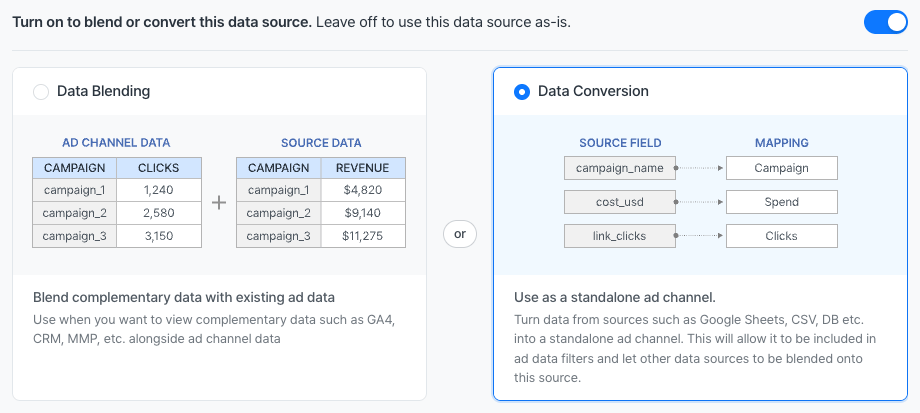
- A traditional print campaign tracked in Google Sheets — convert it so spend rolls up alongside Meta Ads and Google Ads in channel-level totals.
- An in-house affiliate program exported as a CSV — convert it so the affiliate channel can be filtered like any other ad source.
- A regional ad network with no direct API — pull totals into BigQuery, then convert so blended attribution data (HubSpot, AppsFlyer) can layer onto it.
Eligible data sources
Data conversion is available for non-ad data sources where columns are user-defined:- Google Sheets
- CSV File Import
- BigQuery, PostgreSQL, Redshift, MySQL (any of the database connectors)
- Amazon S3 file imports
Open the conversion settings
- Open the Connections menu and pick the data source.
- Open Data source settings.
- Open the Data integration tab.
- Turn the toggle on. The label reads “Turn on to blend or convert this data source. Leave off to use this data source as-is.”
- Pick the Data Conversion card — “Use as a standalone ad channel. Turn data from sources such as Google Sheets, CSV, DB etc. into a standalone ad channel. This will allow it to be included in ad data filters and let other data sources to be blended onto this source.”
Map source columns to ad-data columns
The conversion editor shows two columns:- Target field — the ad-data column that the converted source will populate (Spend, Impressions, Clicks, Campaign, Ad Set, etc.).
- Source field — the column from the non-ad source that contains the value.
Channel cannot be mapped because the data source itself becomes the channel. Adriel recommends mapping the full advertising hierarchy — Campaign, Ad Set, and Ad — for the most flexibility in dashboards.
Some target fields require companion fields. For example, an Ad Set mapping typically requires a Campaign mapping in the same configuration — without the parent, the channel hierarchy is incomplete and the editor blocks save until both are mapped.
Save and start using the converted source
Click Save. The data source now appears as its own ad channel inside Adriel:- It shows up in the Channel filter list and in the channel selector on every widget.
- It contributes to channel-level totals (spend, impressions, clicks).
- Other data sources can be blended onto it via Data blending — for example, blending a HubSpot Deals source onto the converted channel for downstream attribution.
Troubleshooting
Save is blocked even though every row looks filled in
Save is blocked even though every row looks filled in
Two common causes: (1) one row has an empty Target field or Source field — incomplete pairs block save; (2) a mapped target column requires a companion column (e.g., Ad Set requires Campaign). Add the missing companion mapping.
The converted source doesn't show up in the channel filter
The converted source doesn't show up in the channel filter
Channel filter lists rebuild after the next refresh of the data source. Trigger a manual refresh from Data source settings → Refresh, or wait for the next scheduled refresh.
Switching from Data Blending to Data Conversion lost the existing blend setup
Switching from Data Blending to Data Conversion lost the existing blend setup
The two modes store settings separately. Switching modes does not delete the other mode’s saved configuration — toggle back to Data Blending and the previous settings are still there. Only the active mode applies.
Converted source's totals don't match the spreadsheet's own totals
Converted source's totals don't match the spreadsheet's own totals
Check the Date mapping — if the source date column uses a non-standard format, Adriel may have parsed it incorrectly. The Data integration tab includes a date-format detector; if detection fails, enter the format manually.